Desktop-Class Creative & Document Tools. In Your Browser.
Compress photos, edit PDFs, dub video voices, generate invoices, and test WCAG contrast. 100% private WebAssembly processing with zero cloud uploads.
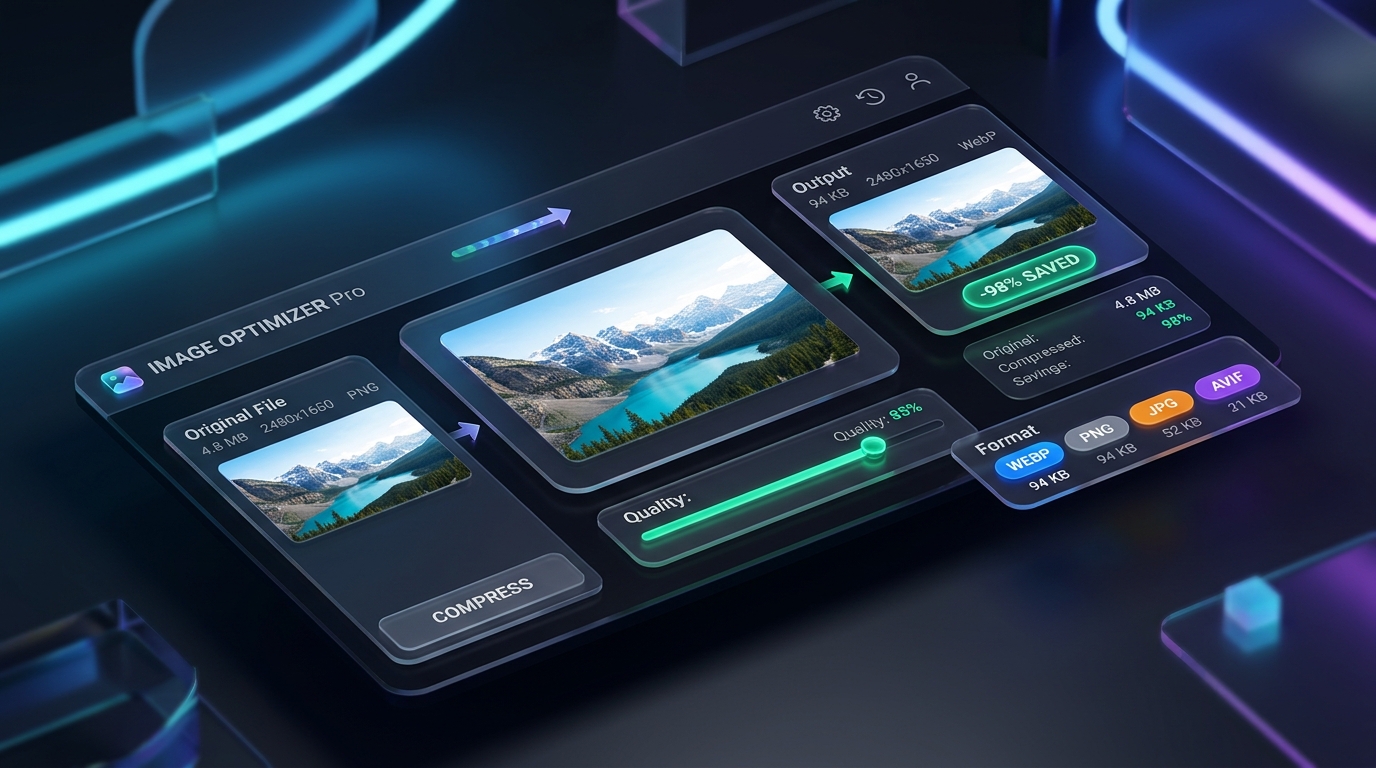
Zero Visual Degradation
Drag the slider to compare original 4.8MB photography against browser-compressed output. Sharp edges, rich colors, and transparency remain pristine.
Merge PDF
Combine multiple PDF files into a single unified document in seconds.
Split PDF
Extract specific page ranges or separate all pages into individual files.
Compress PDF
Reduce PDF file size while keeping text and illustrations sharp and clear.
JPG to PDF
Convert JPG, PNG, and WebP images into high-quality A4 PDF documents.
Sign PDF
Draw your signature with mouse or finger and stamp it directly onto your PDF.
Rotate PDF
Rotate upside-down or sideways PDF pages by 90, 180, or 270 degrees.
Add Watermark
Protect your documents with custom text watermarks and adjustable opacity.
Page Numbers
Insert clean page numbers at the bottom or top of every page.
Organize PDF
Rearrange pages, remove unwanted pages, and build the perfect document.
PDF to Text
Quickly extract readable text and summary details from your PDF document.
PDF to JPG
Convert PDF pages into high-resolution JPG or PNG images with ZIP export.
Crop PDF
Trim unwanted white margins, headers, or borders from PDF pages.
Remove PDF Pages
Delete unwanted, blank, or duplicate pages from your PDF file.
Extract PDF Pages
Extract specific pages or custom ranges into a new standalone PDF.
Unlock PDF
Remove password restrictions and decrypt protected PDF files.
Scan to PDF
Scan physical documents with your device camera and compile into an A4 PDF.
Compare PDF
Compare two PDF documents side by side to detect text differences.
PDF to Word
Convert PDF documents into editable Microsoft Word (.doc) files.
Repair PDF
Recover unreadable or corrupted PDF files by rebuilding object streams.
Image Compressor
Compress photos to custom exact sizes (KB) or percentage with zero quality loss.
Compress to 100KB
Instantly resize and compress images under 100KB for exam and job forms.
Compress to 50KB
Get photos under 50KB for UPSC, SSC, state PSC, and government portals.
Compress to 20KB
Compress signatures and small ID photos under 20KB with maximum clarity.
Compress to 200KB
Target exact 200KB limit for university applications and bank documents.
Compress to 500KB
Reduce high-resolution photos to under 500KB for fast web and email sharing.
Compress JPEG
Optimize JPG/JPEG images while preserving sharpness and vivid colors.
Compress PNG
Shrink PNG file size while maintaining crystal-clear transparency.
Convert to WebP
Convert heavy images to modern, super lightweight WebP format for fast websites.
Resize in KB
Set custom exact target KB values with automated precision optimization.
Favicon Generator
Generate multi-size favicons and app icons with instant ZIP download.
JSON Formatter & Validator
Format, beautify, validate, and minify JSON data with real-time syntax checking.
Base64 Encoder & Decoder
Convert plain text into Base64 strings and decode Base64 back to original text.
JWT Decoder & Inspector
Decode JSON Web Tokens securely without sending sensitive tokens over the network.
Unix Timestamp Converter
Convert Epoch timestamps to human dates (UTC, local) and vice versa with live epoch clock.
URL Encoder & Decoder
Encode or decode query strings, URI components, and full URLs with special character escaping.
UUID / GUID Generator
Generate random Version 4 UUIDs and GUIDs in bulk with uppercase and hyphen options.
CSV to JSON Converter
Convert CSV spreadsheets to JSON objects or arrays and JSON to CSV tables.
SQL Formatter & Beautifier
Beautify and indent complex SQL queries with standardized capitalized keywords.
Code Minifier (HTML, CSS, JS)
Strip comments and whitespace from HTML, CSS, and JS to reduce file size and speed up page loads.
XML to JSON Converter
Parse XML tags and convert them into structured JSON trees instantly.
CSS Box Shadow Generator
Interactive sliders to craft smooth modern CSS box shadows with live element preview.
CSS Gradient Generator
Design custom linear and radial CSS background gradients with live canvas preview.
Color Converter (HEX, RGB, HSL, CMYK)
Instant synchronization between HEX, RGB, HSL, and CMYK color models with visual picker.
Regex Tester & Debugger
Test regular expressions in real time with group matching and flag toggles.
Cron Expression Generator & Explainer
Translate 5-part cron syntax into human-friendly English sentences with common presets.
Markdown to HTML Converter
Dual-pane live markdown editor with real-time HTML markup generation.
Hash Generator (SHA-256, SHA-1, SHA-512)
Generate secure cryptographic checksums and hashes in browser WebCrypto.
HTML Entities Encoder & Decoder
Convert reserved characters into HTML character entities and decode back to text.
Color Contrast Checker
Calculate WCAG 2.1 AA & AAA contrast ratios with color blindness simulator.
AI Video Dubbing & Voice Translator
Translate video dialogue into 30+ languages with matched voice tone, lip-sync pacing, and background music.
Video Voice Translator & Cloner
Translate spoken video audio into another language with matched vocal characteristics and timing.
Video Trimmer & Cutter
Cut and trim video clips to exact start and end times instantly in browser.
Mute Video (Remove Audio)
Remove audio track from any video and download a clean silent MP4 file.
Video to GIF Converter
Convert short video clips into animated GIFs with custom FPS and resolution.
Video Frame Extractor
Grab any exact frame from a video and save it as a high-quality PNG image.
Video Speed Changer
Make videos slow-motion (0.5x) or fast-forward timelapse (2x, 4x) in browser.
Rotate & Flip Video
Rotate video 90° or flip mirror horizontally or vertically for correct orientation.
Video Metadata Inspector
View video resolution, FPS, duration, codec, and file size details instantly.
Audio Trimmer & Ringtone Maker
Cut MP3/WAV audio to any start-end time and save as ringtone or short clip.
Voice & Microphone Recorder
Record high-quality voice or mic audio directly in browser, no app needed.
Audio Merger & Joiner
Combine multiple MP3 or audio files end-to-end into a single merged audio file.
Reverse Audio
Play any audio file backwards for creative sound effects and music production.
Word & Character Counter
Count words, characters, sentences, and estimate reading time instantly.
Text Case Converter
Convert text to UPPERCASE, lowercase, Title Case, camelCase, and kebab-case.
Text Diff Checker
Compare two texts side-by-side and highlight added, changed, and removed lines.
URL Slug Generator
Convert article titles into clean SEO-friendly URL slugs automatically.
Remove Duplicate Lines
Instantly deduplicate large keyword lists, email lists, or text line by line.
Lorem Ipsum Generator
Generate customizable dummy placeholder text in paragraphs, sentences, or words.
Sort Lines Alphabetically
Sort text lines A-to-Z or Z-to-A alphabetically, or by line length.
QR Code Generator
Create custom QR codes for URLs, Wi-Fi, WhatsApp, contact cards, and more.
YouTube Thumbnail Grabber
Download any YouTube video thumbnail in HD or 4K quality instantly for free.
Barcode Generator
Generate EAN-13, UPC-A, Code128, and QR barcodes for products and labels.
Instagram Grid Splitter
Split one photo into a 3x3 or 3x1 Instagram grid for profile grid art.
Instagram Reel Downloader
Download Instagram Reels in Full HD 1080p MP4 without watermark for free.
Instagram Audio & Sound Downloader
Extract and download background music, sound tracks, and audio from Instagram Reels as MP3.
Instagram Story & Highlight Downloader
Save public Instagram stories and profile highlights in full HD before they expire.
Instagram Photo & Carousel Downloader
Download original full-resolution Instagram post photos and multi-image carousels.
Strong Password Generator
Generate cryptographically secure random passwords with custom rules and length.
Password Strength Checker
Test your password strength and see the estimated time it would take to crack.
Random String & Token Generator
Generate secure random strings for API keys, tokens, secrets, and session IDs.
File Hash Verifier (MD5, SHA)
Verify downloaded file integrity by comparing MD5, SHA-256, or SHA-512 checksums.
Age Calculator
Calculate exact age in years, months, and days from any date of birth.
Percentage Calculator
Calculate percentage, percentage change, and discount amounts instantly.
GST & VAT Calculator
Add or remove GST/VAT from any price with 5%, 12%, 18%, 28% tax slabs.
EMI & Loan Calculator
Calculate monthly EMI, total interest, and loan repayment breakdown instantly.
BMI Calculator
Calculate Body Mass Index (BMI) and healthy weight range for your height.
Free Invoice Generator
Create and download professional PDF invoices and receipts in seconds.
Tip Calculator
Calculate dining tips, split group bills, and copy Venmo payment links.
Data Storage Converter
Convert between bytes, KB, MB, GB, TB, and PB instantly with accurate results.
Length & Distance Converter
Convert meters, feet, inches, km, miles, cm, and other length units.
Weight & Mass Converter
Convert kg, grams, pounds (lbs), ounces, and tonnes with precision.
Temperature Converter
Convert Celsius, Fahrenheit, and Kelvin temperature units with live results.
Speed & Velocity Converter
Convert km/h, mph, m/s, knots, and Mach speed units for travel and engineering.
How PixyTool Works in 4 Simple Steps
Illustrated step-by-step workflow. Zero server delays, zero data leaks, 100% private in your browser.
Why PixyTool Is 10x Safer & Faster
See the difference between old cloud upload converters and PixyTool's zero-upload client architecture.
Traditional Cloud Converters
Remote server processing
- Uploads private documents, IDs, and signatures to third-party servers.
- Slow upload & download queues on mobile networks.
- Strict daily file quotas and aggressive subscription paywalls.
- Risk of permanent cloud storage retention or security leaks.
PixyTool In-Browser EngineRecommended
100% Client-side local execution
- Zero Server Uploads: Files never leave your browser memory.
- Instant Speed: Zero network latency, instant conversions.
- Unlimited & Free: Process unlimited files without signup or limits.
- Mobile-Optimized: Smooth touch experience across iOS & Android.
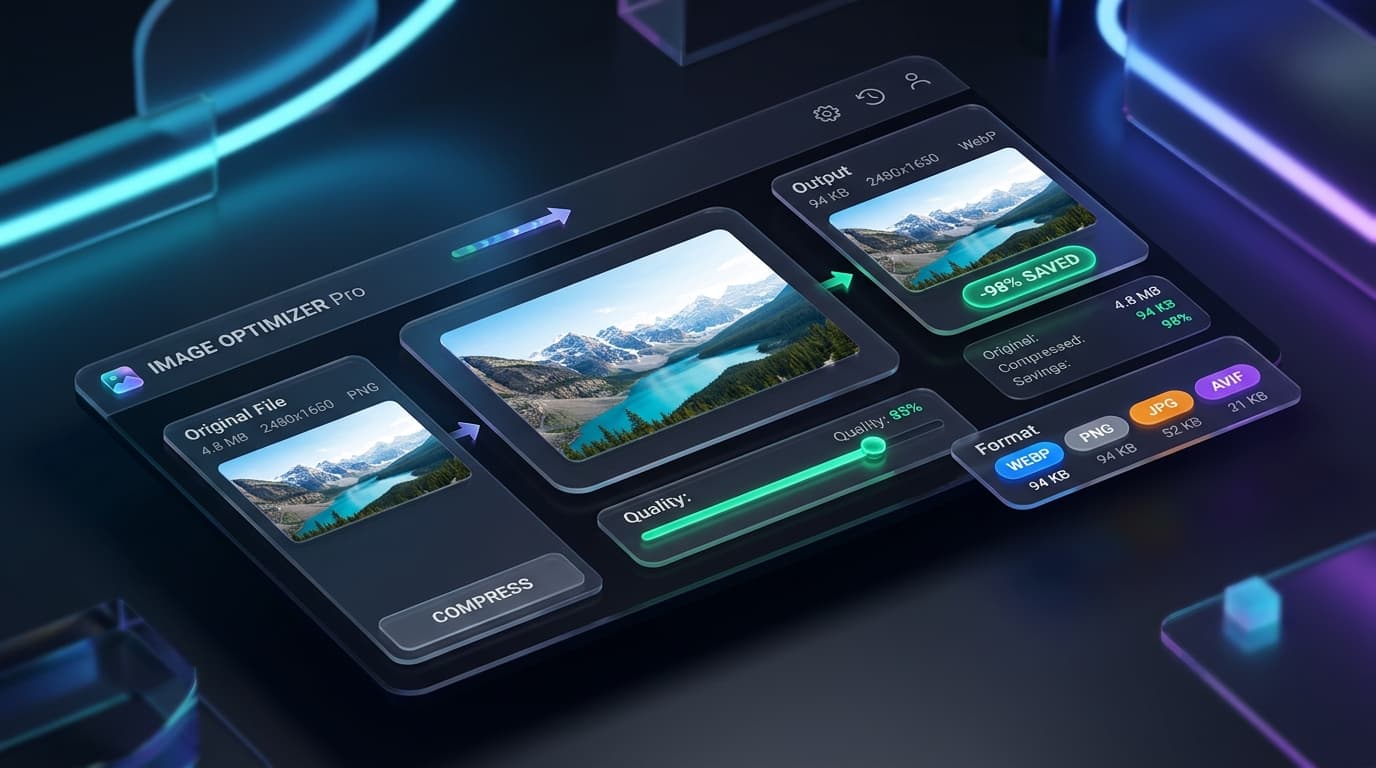
Squeeze Megabytes into Kilobytes with Zero Loss
Engineered with modern WebAssembly codecs to compress high-resolution photos directly in browser memory. Keep crisp edges, vibrant colors, and transparent backgrounds while drastically reducing file sizes.
4.8 MB Photo → 94 KB Output
Reduce file size by up to 98% while preserving clarity for job applications and exam portals.
100% Private In-Browser Execution
Your photos never leave your device. Zero server uploads, zero data logs, 100% confidential.
Custom Target Presets
Exact file size targeting for 100KB, 50KB, 20KB or precision manual quality sliders.
Visual Split: Zero Quality Loss Guarantee
Drag the interactive slider below to inspect side-by-side sharpness between the original 4.8MB file and the compressed 94KB output.
Quick Image Compressor
Drop any photo below to instantly compress it under exact sizes like 100KB, 50KB, or 20KB.
Image Compressor
Target Size ModeChoose your target file size or adjust quality manually
Tap to Select Photos or CameraDrag & drop images here, or browse files
Supports JPG, PNG, WebP, AVIF, HEIC • Bulk files • 100% In-Browser
Supported Media Formats & Standards
PixyTool processes all major industry formats natively inside browser memory without sending bytes to external clouds.
Google WebP
The modern gold standard for web performance
- Full Alpha Transparency
- Lossless & Lossy Modes
- Fast Web Rendering
JPEG / JPG
Universal standard supported on 100% of devices
- 24-Bit TrueColor Support
- Strict Portal Compliant
- Zero Compatibility Issues
Portable Network Graphics
Crystal-clear lossless sharpness with alpha transparency
- Transparent Backgrounds
- Zero Compression Artifacts
- Ultra-Sharp Text Lines
AV1 Image File Format
Next-generation codec with extraordinary compression efficiency
- 10-Bit & 12-Bit HDR Color
- Deep Neural Compression
- Modern Browser Native
Portable Document Format
Vector document container with strict layout preservation
- Multi-Page Organization
- Digital Watermarks & Signatures
- Archival Compliance
Scalable Vector Graphics
Infinite resolution vector mathematics with 0 pixelation
- Infinite Scalability
- Clean XML Code Structure
- Lightweight Byte Size
Engineered for Quality & Performance
Why PixyTool Is The First Choice For Creators
Engineered specifically to solve strict upload constraints for government job forms, exam portals, web developers, and professional photographers.
Exact Target Size (100KB, 50KB, 20KB & More)
Never guess quality settings again. Select your required size (like 100KB or 50KB) and our tool automatically tunes the compression to make sure your photo fits safely under that limit.
Crystal Clear Quality (No Blurry Images)
Keep your photos sharp and clear. Our smart compressor shrinks the file size while preserving faces, document text, and signatures so they look just as good as the original.
Compress Multiple Photos & 1-Click ZIP
Compress dozens of photos at once without slowdowns. Download them individually or save everything together in one neat ZIP file with a single click.
Side-by-Side Before & After Comparison
Check the quality before downloading. Use the interactive split slider to compare your original photo and the compressed version side by side.
Convert Between Formats (WebP, JPG, PNG)
Easily convert photos between JPG, PNG, and modern WebP formats. Keep transparent backgrounds for logos or optimize photos for fast web sharing.
Instant Speed & Works 100% Offline
Everything happens directly on your device with no waiting for uploads. Once the website is opened, you can even compress images without an internet connection.
Exact Target Size (100KB, 50KB, 20KB & More)
Never guess quality settings again. Select your required size (like 100KB or 50KB) and our tool automatically tunes the compression to make sure your photo fits safely under that limit.
Crystal Clear Quality (No Blurry Images)
Keep your photos sharp and clear. Our smart compressor shrinks the file size while preserving faces, document text, and signatures so they look just as good as the original.
Compress Multiple Photos & 1-Click ZIP
Compress dozens of photos at once without slowdowns. Download them individually or save everything together in one neat ZIP file with a single click.
Side-by-Side Before & After Comparison
Check the quality before downloading. Use the interactive split slider to compare your original photo and the compressed version side by side.
Convert Between Formats (WebP, JPG, PNG)
Easily convert photos between JPG, PNG, and modern WebP formats. Keep transparent backgrounds for logos or optimize photos for fast web sharing.
Instant Speed & Works 100% Offline
Everything happens directly on your device with no waiting for uploads. Once the website is opened, you can even compress images without an internet connection.

Your Personal Photos & Documents Never Leave Your Device
Most online compressor websites upload your sensitive ID cards, signatures, and private photos to unknown remote servers. PixyTool works completely on your phone or computer. Nothing is ever uploaded, stored, or viewed by anyone.
How to Compress Images to Exact Size (Under 100KB / 50KB)
Follow these quick steps to shrink your photos to exact target sizes without sacrificing visual clarity.
Upload Your Image
Drag and drop your photos into the upload box or click to select files from your computer, phone, or tablet. You can upload single photos or dozens in bulk.
Select Your Target Size (e.g. 100KB or 50KB)
Choose one of our quick target size presets (100KB, 50KB, 20KB) or enter any custom size in KB or MB. Alternatively, switch to manual mode to adjust the quality percentage slider.
Inspect & Compare Visual Quality
Click the "Compare" button on any image card to open our interactive split before/after viewer. Verify sharpness, color accuracy, and file size savings.
Download Compressed Image or ZIP
Download individual files with a single click or hit "Download All (ZIP)" to save all compressed images packaged together in seconds.
Upload Your Image
Drag and drop your photos into the upload box or click to select files from your computer, phone, or tablet. You can upload single photos or dozens in bulk.
Select Your Target Size (e.g. 100KB or 50KB)
Choose one of our quick target size presets (100KB, 50KB, 20KB) or enter any custom size in KB or MB. Alternatively, switch to manual mode to adjust the quality percentage slider.
Inspect & Compare Visual Quality
Click the "Compare" button on any image card to open our interactive split before/after viewer. Verify sharpness, color accuracy, and file size savings.
Download Compressed Image or ZIP
Download individual files with a single click or hit "Download All (ZIP)" to save all compressed images packaged together in seconds.
Government & Visa Image Requirements
Avoid instant form rejection. Check exact photo dimensions, signature byte limits, and allowed file formats verified against official 2026 recruitment notifications.
| Portal / Examination | Document Type | Strict Size Limit | Required Dimensions | Format | Action |
|---|---|---|---|---|---|
UPSC Civil Services (IAS / IFS / NDA) Face must occupy 3/4th of the photo, plain white background. | Photograph | 20 KB – 300 KB (Recommended: 100KB) | 350 × 350 px (Min) to 1000 × 1000 px | JPG / JPEG | Compress |
UPSC Civil Services (IAS / IFS / NDA) Black ink on white paper, strictly under 20KB. | Signature | 10 KB – 20 KB (Strict) | 350 × 350 px (Min) to 1000 × 1000 px | JPG / JPEG | Compress |
SSC CGL, CHSL, MTS & GD Constable Without spectacles or cap, light/white background. | Photograph | 20 KB – 50 KB | 3.5 cm (W) × 4.5 cm (H) | JPEG / JPG | Compress |
SSC CGL, CHSL, MTS & GD Constable Clear signature in running hand, strictly between 10KB and 20KB. | Signature | 10 KB – 20 KB | 4.0 cm (W) × 2.0 cm (H) | JPEG / JPG | Compress |
US Visa (DS-160 / Tourist / Student F1) Neutral expression, plain white background, max 240KB. | Visa Photograph | ≤ 240 KB (Ideal: 200KB) | 600 × 600 px (Square 2×2 inches) | JPEG / JPG | Compress |
Schengen European Visa (VFS Global) 70%–80% of photo covered by face, taken within last 6 months. | Visa Photograph | ≤ 100 KB | 35 mm × 45 mm | JPG / JPEG | Compress |
Passport Seva (Indian Passport Online) Clear color photo with white background, front view. | Photo & Supporting Docs | ≤ 200 KB | 4.5 cm × 3.5 cm | JPEG / JPG | Compress |
NEET UG (NTA Medical Entrance) White background, with candidate name and date of photo at bottom. | Passport & Postcard Photo | 10 KB – 200 KB | Postcard (4×6 in) / Passport (3.5×4.5 cm) | JPG / JPEG | Compress |
NEET UG (NTA Medical Entrance) Blue ink impression on white paper, clearly visible ridges. | Finger / Thumb Impressions | 10 KB – 200 KB | Left & Right hand fingers | JPG / JPEG | Compress |
GATE / JAM (IIT Entrance Exam) Aspect ratio 3:4, uniform light background, strictly verified. | Photograph | 5 KB – 200 KB | 480 × 640 px (Min) to 2400 × 3200 px | JPEG / JPG | Compress |
IBPS / SBI Bank PO & Clerk Recent passport photo, no red-eye or reflections in glasses. | Photograph | 20 KB – 50 KB | 200 × 230 px (4.5 × 3.5 cm) | JPG / JPEG | Compress |
IBPS / SBI Bank PO & Clerk Black ink signature in cursive, CAPITAL letters not accepted. | Signature & Declaration | 10 KB – 20 KB | 140 × 60 px | JPG / JPEG | Compress |
UPSC Civil Services (IAS / IFS / NDA)
Face must occupy 3/4th of the photo, plain white background.
Compress for UPSCUPSC Civil Services (IAS / IFS / NDA)
Black ink on white paper, strictly under 20KB.
Compress for UPSCSSC CGL, CHSL, MTS & GD Constable
Without spectacles or cap, light/white background.
Compress for SSCSSC CGL, CHSL, MTS & GD Constable
Clear signature in running hand, strictly between 10KB and 20KB.
Compress for SSCUS Visa (DS-160 / Tourist / Student F1)
Neutral expression, plain white background, max 240KB.
Compress for USSchengen European Visa (VFS Global)
70%–80% of photo covered by face, taken within last 6 months.
Compress for SchengenPassport Seva (Indian Passport Online)
Clear color photo with white background, front view.
Compress for PassportNEET UG (NTA Medical Entrance)
White background, with candidate name and date of photo at bottom.
Compress for NEETNEET UG (NTA Medical Entrance)
Blue ink impression on white paper, clearly visible ridges.
Compress for NEETGATE / JAM (IIT Entrance Exam)
Aspect ratio 3:4, uniform light background, strictly verified.
Compress for GATEIBPS / SBI Bank PO & Clerk
Recent passport photo, no red-eye or reflections in glasses.
Compress for IBPSIBPS / SBI Bank PO & Clerk
Black ink signature in cursive, CAPITAL letters not accepted.
Compress for IBPSFormat Knowledge Base
Image Format Comparison: Which One Should You Use?
Compare compression ratios, transparency, browser compatibility, and best use cases across modern formats.
| Format | Compression Ratio | Transparency | Browser Support | Best For |
|---|---|---|---|---|
| WebPRecommended | Up to 85% smaller | Yes (Lossy & Lossless) | 97.5% (All modern browsers) | Modern websites, blogs, eCommerce, high compression |
| JPEG / JPG | Up to 75% smaller | No | 100% (Universal) | Photographs, digital camera photos, print uploads |
| PNG | Up to 50% smaller | Yes (Full 8-bit alpha) | 100% (Universal) | Logos, screenshots, graphics with text, transparency |
| AVIF | Up to 90% smaller | Yes (10-bit & 12-bit HDR) | 93% (Chrome, Safari 16+, Firefox) | Cutting-edge web apps, ultra-high compression |
Real-World Applications
Tailored For Exact Upload Requirements
Designed specifically to help users pass strict file size filters across top official portals and online platforms.
UPSC, SSC & Govt Job Applications
Government job portals reject files exceeding 50KB or 100KB. Our preset mode automatically sizes your portrait photo to comply with portal specifications.
Digital Signatures & Thumb Impressions
Official forms demand signatures under 20KB with clear lines and clean white backgrounds. Our high-contrast signature preset ensures instant acceptance.
Passport, Visa & USCIS Portals
Embassy and immigration portals require strict file sizes. Compress photos without distorting facial proportions or biometric markers.
Websites, Blogs & Online Stores
Heavy images slow down websites. Convert large photos to WebP to make pages load much faster and improve your site speed.
Resumes, Job Portals & Emails
Avoid email errors and job portal upload failures by compressing your profile picture and CV documents to under 200KB.
UPSC, SSC & Govt Job Applications
Government job portals reject files exceeding 50KB or 100KB. Our preset mode automatically sizes your portrait photo to comply with portal specifications.
Digital Signatures & Thumb Impressions
Official forms demand signatures under 20KB with clear lines and clean white backgrounds. Our high-contrast signature preset ensures instant acceptance.
Passport, Visa & USCIS Portals
Embassy and immigration portals require strict file sizes. Compress photos without distorting facial proportions or biometric markers.
Websites, Blogs & Online Stores
Heavy images slow down websites. Convert large photos to WebP to make pages load much faster and improve your site speed.
Resumes, Job Portals & Emails
Avoid email errors and job portal upload failures by compressing your profile picture and CV documents to under 200KB.
Why PixyTool Processes Everything In Your Browser
Most online file conversion websites upload your sensitive documents, personal pictures, signature scans, and identity proofs to remote cloud servers. This poses severe data privacy vulnerabilities and forces you to endure slow network upload and download queues.
At PixyTool (pixytool.com), we built our tools with a privacy-first mindset. All file modifications, PDF merges, signature stamping, and image compression routines execute entirely on your own device through modern browser sandboxes. Your documents never travel across the web, ensuring absolute confidentiality, instant speeds, and zero file count limits.
Explore PixyTool Free Online Tools Directory
Quickly switch between PDF utilities, image compressors, developer tools, video processing, text tools, and calculators. All tools run 100% locally in your browser for unmatched privacy and speed.
Combine multiple PDF files into a single unified document in seconds.
Extract specific page ranges or separate all pages into individual files.
Reduce PDF file size while keeping text and illustrations sharp and clear.
Convert JPG, PNG, and WebP images into high-quality A4 PDF documents.
Compress photos to custom exact sizes (KB) or percentage with zero quality loss.
Instantly resize and compress images under 100KB for exam and job forms.
Get photos under 50KB for UPSC, SSC, state PSC, and government portals.
Compress signatures and small ID photos under 20KB with maximum clarity.
Format, beautify, validate, and minify JSON data with real-time syntax checking.
Convert plain text into Base64 strings and decode Base64 back to original text.
Decode JSON Web Tokens securely without sending sensitive tokens over the network.
Convert Epoch timestamps to human dates (UTC, local) and vice versa with live epoch clock.
Translate video dialogue into 30+ languages with matched voice tone, lip-sync pacing, and background music.
Translate spoken video audio into another language with matched vocal characteristics and timing.
Cut and trim video clips to exact start and end times instantly in browser.
Remove audio track from any video and download a clean silent MP4 file.
Count words, characters, sentences, and estimate reading time instantly.
Convert text to UPPERCASE, lowercase, Title Case, camelCase, and kebab-case.
Compare two texts side-by-side and highlight added, changed, and removed lines.
Convert article titles into clean SEO-friendly URL slugs automatically.
Calculate exact age in years, months, and days from any date of birth.
Calculate percentage, percentage change, and discount amounts instantly.
Add or remove GST/VAT from any price with 5%, 12%, 18%, 28% tax slabs.
Calculate monthly EMI, total interest, and loan repayment breakdown instantly.
Frequently Asked Questions
Everything you need to know about our image compression technology and file size standards.